
POEGuy's Explosive Arrow Ballista Ancestral Commander PoB & Gems (Poe Legacy of Phrecia Event)

Path of Building – Passive Skill Tree
You can find an optimized Path of Building for the league-start progression setup here
And a PoB for the late endgame setup (For maxing the build and pushing for more damage) you’ll switch to this: here
*Every build I release will use the community fork of Path of Building. You can find PoB’s Fork by LocalIdentity, here.
If you’re new to Path of Building, we have a guide available here.
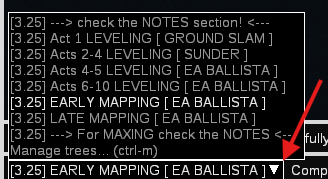
Remember that inside, you have a league-start Skill Tree progression. Start with the one closest to your level and work your way up. The Skill Tree nodes need to be unlocked in the suggested order.
h2. Gem Setups [ENDGAME]
The following gem setup is for the endgame. During the campaign, you will use a different, more simplified setup. Check the POB for the campaign gem setup progression
*To simplify things for new Path of Exile 1 players, I will name the item slots where you will socket the gems.
But remember that in PoE1, you can socket these gem setups into any item that has the correct number of linked sockets and the appropriate colors.
Body Armour
 Explosive Arrow ( Aim for level 21 and 20% gem quality )
 Ballista Totem Support
 Elemental Damage with Attacks Support
 Lifetap Support
 Combustion Support
 Cruelty Support (Later, when you have more currency, you will want to replace this with
  Empower Support Lvl. 4)
Bow
 Cast On Critical Strike Support
 Flammability
 Blood Rage
 Summon Ice Golem
*Remember: you will manually attack harder enemies with  Frenzy to generate Frenzy Charges, apply Flammability, activate Blood Rage, and summon your golem. Everything is fully automated. Even with a low critical strike chance, you will proc these effects very quickly thanks to our absurd attack speed.
Boots
 Dash
Dash Second Wind Support
- Lifetap Support
 Enhance Support (Optional)
Gloves
 Steelskin
- ###item:automation-support###
- Lifetap Support
Helmet
*Be very careful with the helmet links. You will link  Arrogance Support only to
  Vitality!
  Purity of Elements and
  Grace must remain unlinked.
Remember to always level up your gems and apply quality, which can provide significant benefits. If you’re new to the game, pressing and holding down the ALT key on a gem, you can view and read its quality effects! You can apply quality by using ###item:gemcutters-prism###.